
Portview: Enhancing Coastal Navigation
- Aug 17, 2024
- 6 min read
Problem statement
Formerly known as Shoreview, this Spanish start-up embodies an innovative concept designed to facilitate coastal navigation for inexperienced users using augmented reality.
Navigating a boat in a straight line is challenging. The tide, wind, and sail cause the boat to drift off course, requiring the navigator to stay constantly alert and adjust the direction as needed.
Portview allows users to fix a point on the horizon, and through a combination of augmented reality and the phone's compass, it indicates when and where to redirect the boat to stay on course and reach the destination.
While this functionality is quite useful, the Portview team aims to complement the app with additional features and services to help monetize it and ensure its sustainability.

Project goals
Define our user personas and understand their needs.
Identify usability problems in the current product.
Develop new features to make Portview an indispensable app for amateur sailors.
Increase user acquisition and engagement with the app.
Team structure
1 UX/UI Designer
1 UX Researcher
1 Marketing executive
2 Developers
1 Product director
UXR Methods
Method | Type | Purpose |
App Store and Google Play reviews | Qualitative | To determine which aspects of the app are most highly rated and which receive the most criticism from users. |
Online Survey | Quantitative | To learn more about our users in terms of age, occupation, location, and sailing experience. |
In-depth interviews | Qualitative | To understand how sailors plan their trips—how many days in advance they prepare, what essentials they bring, how many people they travel with, their level of experience, the type of boat they use, and the problems they’ve encountered while sailing, among other details. |
Diary study | Qualitative | To compile a travel log of a person sailing along the coast. This helps identify their concerns, priorities, and needs at sea, unforeseen events and how they handle them, when and where they decide to moor, and why. It also reveals areas where they would like assistance. |
User tests | Qualitative | To explore the interaction between users and the app, identify problems, and suggest improvements to enhance the user experience. |
Process
1 – Define problem
A beta version of the app had already been launched in Spain, with more than a hundred active users using it for navigation. However, we knew little about these users, so the next logical step was to get to know them better. To achieve this, I planned a study aimed at obtaining their demographic data and creating user profiles. I was particularly interested in understanding their needs before, during, and after their trips, as well as their concerns and fears, as this information could help us offer features that would provide real value through the app.
2 – Research Design
STEP 1: Desk Research
Analyzed user feedback from the App Store and Google Play, focusing on common themes in ratings, user comments, and suggestions for improvement.
Purpose: Gain initial insights into user perceptions, common issues, and overall satisfaction with the app.
STEP 2: Online Survey
The survey was sent to all active beta users, incentivizing participation with small rewards, such as early access to new features or discounts on related services; and launched in recreational boating groups, on Facebook, reddit, foronavegantes.net, among others.
Purpose: Gather demographic data, general needs, and concerns.
Content:
Demographic Data: Age, gender, occupation, location, level of navigation experience.
Usage Habits: Frequency of app usage, types of trips (recreational, professional, etc.), average navigation time, etc.
Needs and Expectations: Questions about what users need before, during, and after a trip, and which features they value in a navigation app.
Concerns and Fears: Identify concerns related to safety, resources, weather conditions, etc.
STEP 3: In-Depth Interviews
Interviews were carried out remotely or in person, depending on participants’ availability and location.
Purpose: Explore users’ experiences, needs, and concerns in detail.
Participant Selection: A representative group from the survey respondents who express interest in participating in more detailed interviews, including users with varying levels of navigation experience and usage patterns.
Interview Guide:
Navigation Experience: Their general experience and how they integrate the app into their trips.
Before the Trip: What preparations they make, what information they need, how they plan their route.
During the Trip: How they use the app in real-time, which tools they use the most, what they would like to improve.
After the Trip: What analysis or feedback they desire from their experience, how they manage data or information gathered during the trip.
Fears and Concerns: Their biggest fears related to navigation and how they believe the app could help.
STEP 4: User Diaries
Participants were asked to send voice notes, pictures and clips through Whatsapp during their trip, and offered early access to upcoming Portview premium features for their participation.
Purpose: Observe user behavior in their real usage context.
Participant Selection: A small group of representative users willing to document their experience during a navigation trip.
Instructions: Participants were asked to record how they use the app before, during, and after the trip, including any unresolved issues or needs. They could do this through written notes, photos, or voice recordings.
Duration: approximately 1 week, covering at least one complete navigation trip.
STEP 5: Moderate User tests
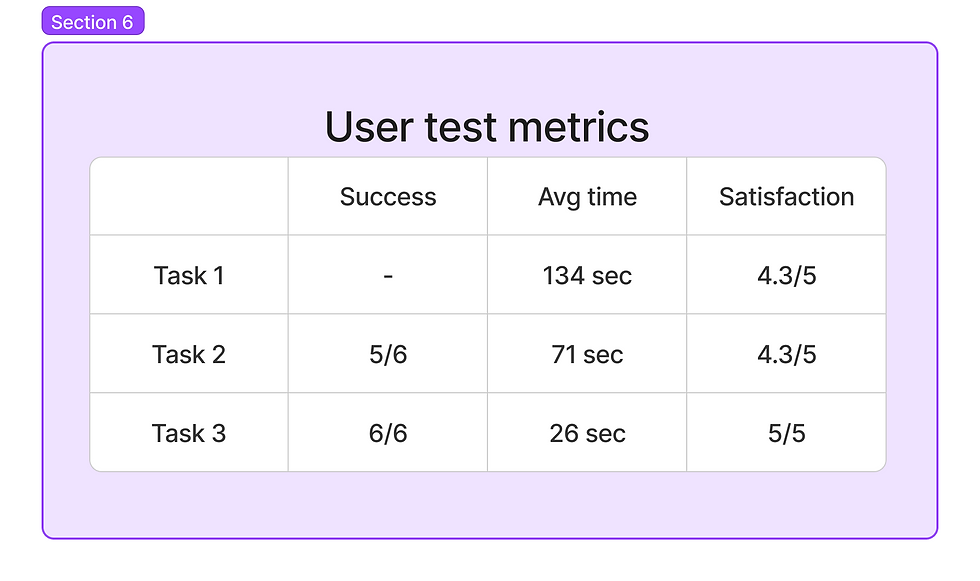
Participants were observed while using the app, while I was guiding them through tasks and asking follow-up questions. Participants were encouraged to verbalize their thoughts as they interacted with the app, providing insights into their decision-making process and any confusion they encounter.
Tasks:
Task 1: Free exploration
Task 2: Plan a route and use the app as a navigation aid.
Task 3: Find a nearby harbour and find out if it has a mooring.
Participant Selection: 3 novice and 3 experienced sailors.
3 – Sample
Online Survey: 150 responses collected
In-depth interviews: 10 sailors
Diary study: 6 sailors (4 of them Portview users)
User test: 6 participants
4 – Gathering data
For desk research, I analyzed App Store and Google Play reviews using Appfollow.io, which helped me identify recurring themes and categorize feedback into key areas such as usability, functionality, design, and customer support. The platform also automated a sentiment analysis, classifying reviews as positive, negative, or neutral.
I created the online survey using Google Forms and shared it via social media posts. A link was also placed within the app, inviting users to complete the survey. As a final question, I included an invitation to participate in further studies, allowing users to leave their contact details.
Feedback from the online surveys provided the majority of volunteers for the diary studies. However, recruiting participants for the interviews and user tests proved challenging, so I traveled to Alicante and Valencia to recruit potential Portview users in person.





5 - Analyzing data
Survey results were analyzed to identify patterns and segment users based on demographics, usage habits, and needs. Combined with feedback from the interviews, this analysis helped craft detailed user personas.
The diary study analysis revealed user needs and provided insights into what features could be added to Portview to enhance the sailing experience.
User testing and the analysis of app reviews helped identify usability and accessibility issues, as well as opportunities for improving the overall user experience.
6 – Results and conclusions
Users Personas:

Usability report:
User feedback:
For some boats, a tripod or mobile support is required if you want to navigate using the directions shown in the app.
The screen visibility is often hindered by exterior brightness, and the interface colors have low contrast, making it difficult to read.
Experienced or professional sailors felt that they wouldn’t use the app, as most boats already come with advanced navigation systems.
For novice sailors, Portview is considered a great idea and a must-have for coastal navigation.
Participants expressed interest not only in being informed about potential dangers at sea, such as rocky areas, whales, tide conditions, and wind speed, but also in features like dolphin sightings, tuna shoals, and the ability to contact other sailors via the app.
They also mentioned that they would like the ability to book and pay for moorings in harbors directly through the app.
While most participants planned their trips carefully, those who were more adventurous, with only a moderate level of planning and trips longer than a week, showed greater acceptance of and interest in the app.
Comments